Release 4.1
 Contents |
 Index |
| Discoverer 4i Plus Online Help Release 4.1 |
|
If you are familiar with SQL, you can analyze the SQL statements that Discoverer executes against the database.
To see a worksheet's SQL statements:
The SQL Inspector dialog box appears. It shows the SQL statements used to create your current worksheet.

The SQL statements Discoverer uses to open a workbook or worksheet involve complex programming. Therefore, you cannot simply copy a worksheet's SQL and use it to open another workbook or worksheet.
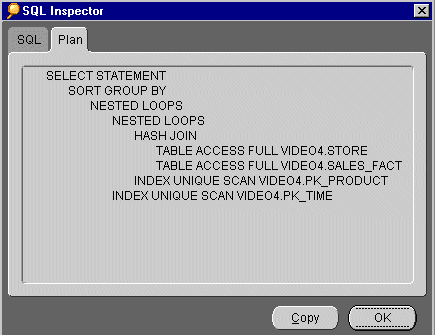
The Plan tab displays the Execution Plan chosen by the Oracle Server for the query request. The Execution Plan defines the sequence of operations that the Oracle Server performs to execute the SQL statement.
You can look at an Execution Plan to see how a SQL statement is being executed. For example, when using Summaries, you may wish to check that a query is using a Summary or Materialized View created by your Discoverer Administrator.
A Summary Folder is how Discoverer represents an underlying Summary table or Materialized view.
Summaries are created by your Discoverer Administrator to improve the performance of Discoverer, to help do your work more quickly and efficiently.
Both Summary tables and Materialized Views precompute and store aggregated data.
|
NOTE: For more information on Summaries and Materialized Views, see Oracle8i Data Warehousing Guide Release 2 (8.1.6) (Part Number A76994-01). |
A Summary Folder contains one or more Items (i.e.columns from a Summary table or Materialized View). You can combine items in a Summary folder into Summary Combinations. From a Summary Combination, Discoverer creates one of the following depending on the version of the database:
To see a worksheet's Execution Plan:
When running Discoverer against an Oracle 8.1.6+ database, the server controls query redirection by rewriting the SQL to use a Materialized View. If a server rewrite occurs, the server Execution Plan indicates the Materialized View name.
You can use the Execution Plan tab in the SQL Inspector dialog to see the SQL statement that Discoverer sends to the server.
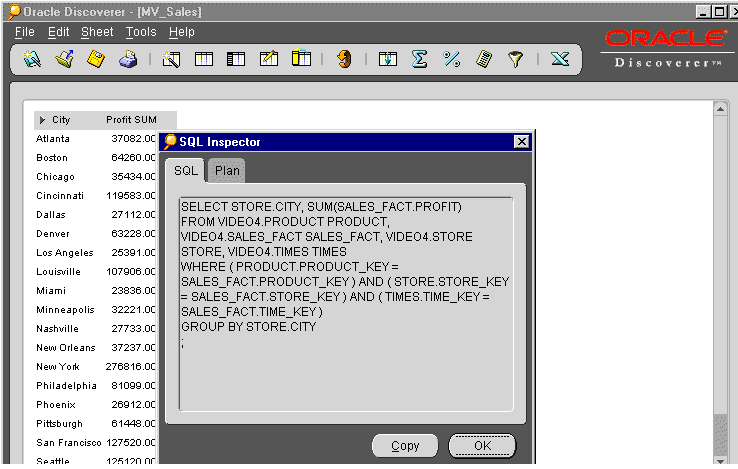
In the screenshot above, the worksheet contains the Items: City and Profit SUM. Although the Discoverer Administrator has created a Summary for these items, the SQL statement displayed in the SQL Inspector SQL tab does not indicate that a Summary, (in this case a Materialized View) is being used.
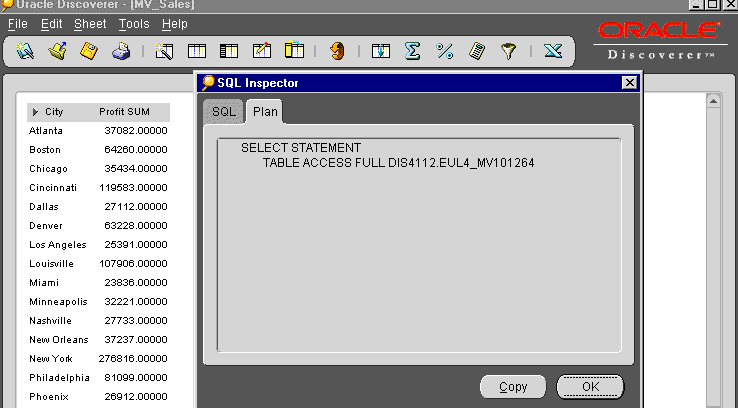
In the screenshot above, you can see from the SQL Inspector Plan tab that a Materialized View Summary is being used by the database, identified by the table name EUL4_MV101264.
NOTE: Materialized View names are prefixed with 'MV'.
|
|
 Copyright © 2000 Oracle Corporation. All Rights Reserved. |
|