Release 4.1
 Contents |
 Index |
| Discoverer 4i Plus Online Help Release 4.1 |
|
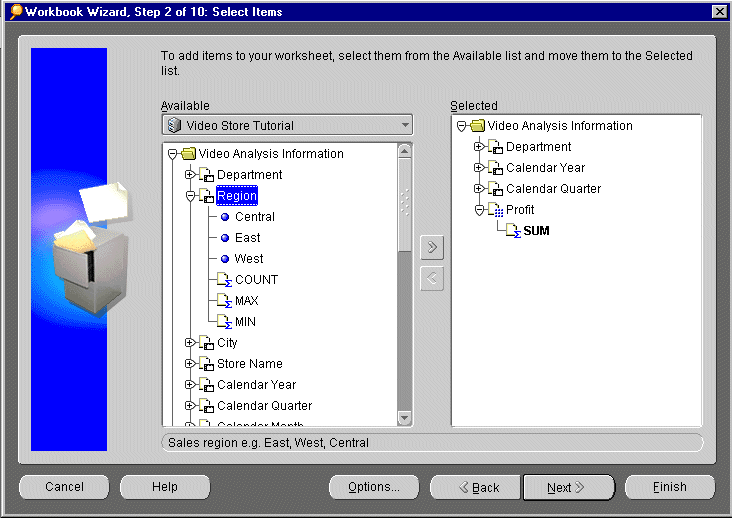
Discoverer provides many features to make your decision-making job easier. In addition to a standard Menu bar and Tool bar, Wizard dialogs such as the Workbook Wizard make much of the process of getting data easier.
Whenever you create a new worksheet, the Workbook Wizard walks you through the steps necessary to get data from the database. The Workbook Wizard represents data as file cabinets, folders, and items. Simply click the folder or item you want and drag it to the Selected column. Your worksheet will contain only the items you select.
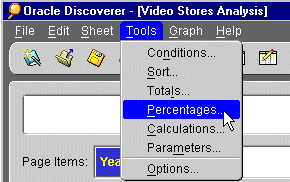
Discoverer provides you with a standard menu bar and tool bar. The menu bar includes selections for common tasks such as printing, saving files, and getting Help. The tool bar includes shortcuts for your most common tasks.
Much of the power of Discoverer is accessible from the menu bar. Each menu selection provides you with a dialog or Wizard to help you perform a task.
The tool bar shows you icons that perform the same tasks as the most common menu selections, such as: Save, Print, Refresh, Sort, and Export to Excel. As you become more familiar with Discoverer, use the tool bar to save you time.

|
|
 Copyright © 2000 Oracle Corporation. All Rights Reserved. |
|