Release 4.1
 Contents |
 Index |
| Discoverer 4i Plus Online Help Release 4.1 |
|
When you connect to Discoverer as an Oracle Applications User, the Connect dialog prompts you to enter your Oracle Applications connect details, (see Status box in Figure 5-4).
If Discoverer is not configured to use Oracle Applications EULs, contact your Discoverer Administrator.
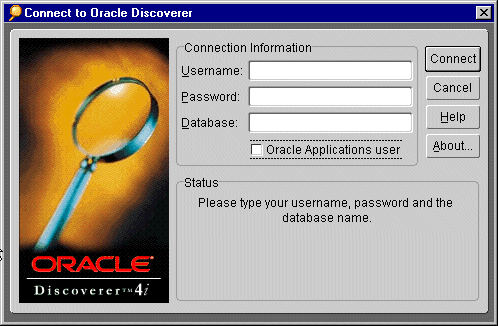
NOTE: An Oracle Applications User check box appears beneath the Connect box when Discoverer is configured to use both standard EULs and Oracle Applications EULs, (see "Connecting to Discoverer as an Oracle Applications User").
Once Discoverer is configured to use Oracle Applications EULs, (see Appendix , "Before you start"), connect to Discoverer as follows:
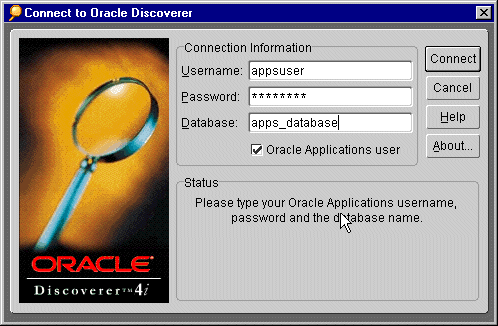
NOTE: The Oracle Applications User check box appears beneath the Connect box when Discoverer is configured to use both standard EULs and Oracle Applications EULs, (contact your Discoverer Administrator for more information).
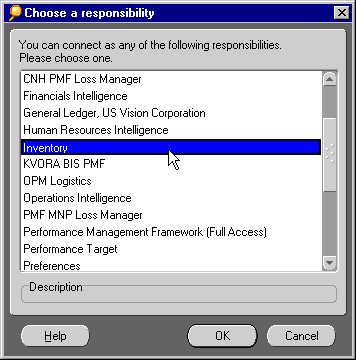
The Choose a Responsibility dialog displays a list of Responsibilities that are defined. If there is more than one Responsibility defined, you must choose the one assigned to you by your Oracle Administrator.
|
|
 Copyright © 2000 Oracle Corporation. All Rights Reserved. |
|