Sharing Workbooks
Sharing a workbook allows other people to view, analyze, and print the workbook. You can share workbooks with other people two ways:
- Share one workbook with multiple users.
- Share multiple workbooks with one other user.
Sharing workbooks lets others use and analyze the same data. For example, you might want everyone in the accounting department to share a workbook that includes accounts payable and accounts receivable information. Similarly, you might want a project manager to have access to all the workbooks created for the project.
To share workbooks, you use the Shared Workbooks dialog. The two tabs at the top of the dialog are for assigning workbooks to users or users to workbooks.
To share one workbook with several other people:
- From the menu, choose File | Manage Workbooks | Sharing. The Share Workbooks dialog appears.
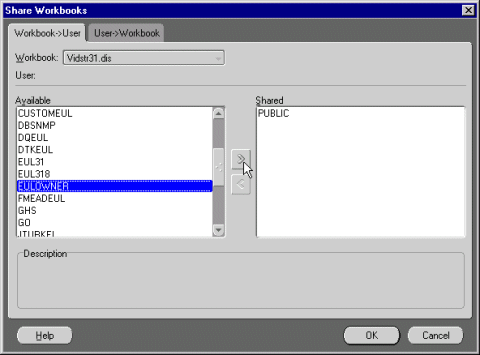
- Click the Workbook -> User tab.
- Choose the name of the workbook that you want to share from the workbook drop-down list.
- In the list of Available Users, click the name of a person with whom you want to share the workbook.
- Click Add. The person's name appears in the Shared list. The names in the Shared list are the people who can have access to the workbook.
- Repeat for all the people with whom you want to share the workbook.
- Click OK.
To share several workbooks with another person:
- From the main Discoverer menu, choose File | Manage Workbooks | Sharing. The Share Workbooks dialog appears.
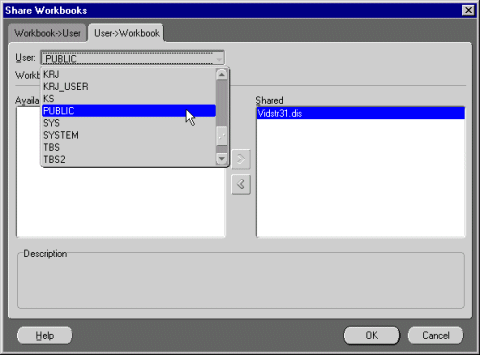
- Click the User -> Workbook tab.
- Choose the name of the person with whom you want to share the workbook from the User drop-down list.
- In the list of Available Workbooks, click the name of a workbook that you want to share with the other person.
- Click Add. The workbook's name appears in the Shared list. The names in the Shared list are the workbooks you have shared with others.
- Repeat for all the workbooks that you want to share with the other person.
- Click OK.


