Discoverer 4i Plus Online Help
Release 4.1


Contents

Index

Simple Calculation Examples

This section provides the following examples to help you create Calculations.


NOTE: For more information on how to create Calculations, refer to "Creating and Editing Calculations"


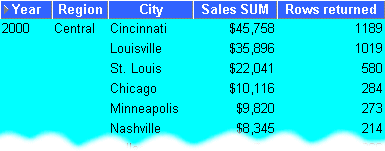
Calculate the number of rows returned by a query

This example calculates the number of rows returned by a query.

Table 5-1 Workbook configuration for `Calculate the number of rows returned by a query'

Select Items 

Video Analysis Information: Year (Calendar Date Year), Region, City, Sales SUM 

Sort Order 

Year, Region, City 

Conditions 

Department = Video Sale OR Department = Video Rental

Year = 2000 AND Region = Central 

Calculation Name 

Rows returned 

Calculation 

ROWCOUNT 

Notes 

ROWCOUNT does not count NULL values. To calculate the number of rows returned by a query, including NULL values, first create a temporary item One record, (Calculation = `1').
Then, create a Calculation Rows returned to count the occurrences of One record, (SUM(Video Sales Analysis.One record)) 

Display Data 


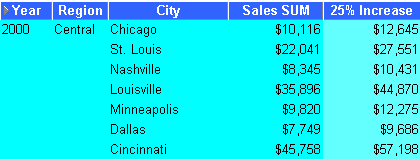
Calculate a 25% increase in sales

This example calculates a 25% increase in sales figures.

Table 5-2 Workbook configuration for `Calculate a 25% increase in profits'

Select Items 

Video Analysis Information: Year (Calendar Date Year), Region, City, Sales SUM 

Sort Order 

Year, Region, City 

Conditions 

Department = Video Sale OR Department = Video Rental

Year = 2000 AND Region = Central 

Calculation Name 

25% Increase 

Calculation 

Sales SUM * 1.25 

Display Data 


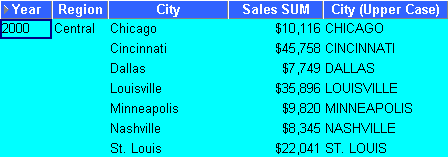
Convert text to upper-case

As well as the extensive range of mathematical functions available in Discoverer, you also have access to a wide range of number and text formatting functions. This example uses a Calculation to re-format City text data to upper-case.

Table 5-3 Workbook configuration for `Convert City text to upper-case'

Select Items 

Video Analysis Information: Year (Calendar Date Year), Region, City, Sales SUM 

Sort Order 

Year, Region 

Conditions 

Department = Video Sale OR Department = Video Rental

Year = 2000 AND Region = Central 

Calculation Name 

City(Upper Case) 

Calculation 

UPPER(City) 

Display Data 


Oracle
Copyright © 2000 Oracle Corporation.

All Rights Reserved.

Contents

Index