Release 4.1
 Contents |
 Index |
| Discoverer 4i Plus Online Help Release 4.1 |
|
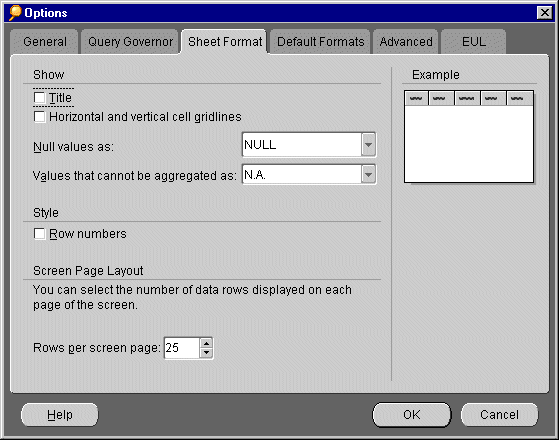
This tab in the Options dialog is for setting the display format of the table or crosstab.
NOTE: Changes to these settings affect the current sheet as well as any new sheets created later.
Title--Displays a title if one was created earlier.
Horizontal and Vertical Gridlines--Lines that separate rows and columns. The display example on the dialog shows a representation of your choices.
Null values as--A cell that contains a null value does not contain any data. Select the text to use to designate a null value from the drop-down list or type a value in the box.
CAUTION: If you select the 0 (zero) symbol as the null value, it may appear to the person looking at the table or crosstab that zero is the actual data. For example, in a cell specifying amount owed, zero means nothing is owed, whereas a null value in the same cell might mean that no information is available about the amount owed. Therefore, using the zero symbol to indicate null values might be misleading to others unless you explicitly state that 0 is equivalent to no data.
Values that cannot be aggregated as--Numbers that cannot be aggregated are formatted one of the values in the pull down list.
Row Numbers (Table only)--Sequential numbers of each row in the table, shown on the left side of the table.
Inline/Outline (Crosstabs only)--Arrangement of the side axis data items. As you select one of the options the example icon represents the arrangement.
Rows per screen page--The number of data rows on each page of the worksheet. Click the up and down arrow buttons to select the number.
See also:
Setting Query Governor Options
Setting General Options
Setting Default Format Options
Setting Advanced Options
Setting EUL Options
Using SQL
|
|
 Copyright © 2000 Oracle Corporation. All Rights Reserved. |
|