Release 4.1
 Contents |
 Index |
| Discoverer 4i Plus Online Help Release 4.1 |
|
Discoverer's default Graphical User Interface settings determine how Discoverer works, looks and feels. Using the Discoverer Options dialog, you can change the default options to suit your preferences and requirements.
Default options apply when you start working with Discoverer. Changes to defaults do not affect previous work. For example, if you use the Options dialog to change the formats for new worksheets, the formatting on previous worksheets is not affected.
NOTE: In addition to opening the Options dialog from the menus, you can also open it by clicking the Options button if available in other dialogs. In that case the options may apply only to the features offered in that dialog.
Click to learn more about:
Setting General Options
Setting Query Governor Options
Setting Sheet Format Options
Setting Default Format Options
Setting Advanced Options
Setting EUL Options
Using SQL
The General options are for opening workbooks and displaying wizard graphics.
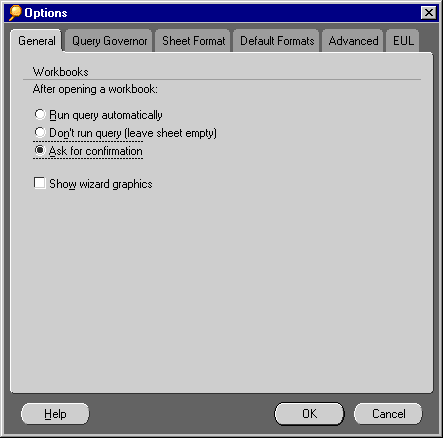
Run query automatically--Discoverer automatically retrieves the data specified by the worksheet in the workbook. Select this option to retrieve data for the worksheet as soon as you open a workbook or click on the tab of a worksheet.
Don't run query (leave sheet empty)--Opens the workbook and worksheet, but does not retrieve any data from the database. That is, the worksheet opens but does not contain any data. A typical reason for selecting this option is to see a different worksheet than the one that opens by default without waiting for the query results.
Ask for confirmation--This is the default selection. After the workbook opens, a dialog asks if you want to run the query for the first worksheet.
Show wizard graphics--Several Discoverer dialogs include artistic graphics (bitmaps). Deselect this option if you don't want to see the graphics in the dialogs.
See also:
Setting Query Governor Options
Setting Sheet Format Options
Setting Default Format Options
Setting Advanced Options
Setting EUL Options
Using SQL
|
|
 Copyright © 2000 Oracle Corporation. All Rights Reserved. |
|